

 Cart is empty

A universal laptop charger can be safe. But the voltage, tip and polarity must all match your laptop. Check the label on your old charger first. Never guess the voltage. A fixed-voltage charger that matches your laptop is the safest and cheapest choice.
What Does “Universal” Actually Mean?
The word is a sales label, not a standard. Three very different products use it.
| Type | How it works | Risk |
|---|---|---|
| Switchable-voltage with tips | You pick a voltage and a tip | Highest. A wrong setting can damage the laptop |
| Fixed-voltage with tips | One voltage, many tips | Medium. Safe only if that voltage matches yours |
| USB-C Power Delivery | The laptop and charger agree on the power | Lowest, if the charger is certified |
Evetech’s guide puts it simply. Universal chargers can be safe when they match the laptop and carry protections and recognised certifications. They aren’t safe by default.
-
Sale!
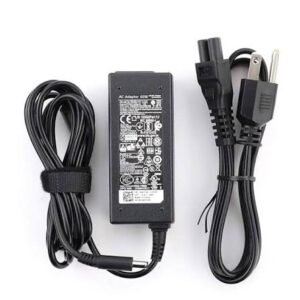
Universal 65W Laptop Charger
Original price was: ₨1,650.00.₨1,500.00Current price is: ₨1,500.00. Add to cart
Is a Universal Laptop Charger Safe for Your Laptop?
It’s safe when three things match. If any one is wrong, don’t plug it in.
- Voltage. The output must equal the voltage on your original charger. Not close. The same.
- Polarity. The centre pin of the plug must be positive or negative, the same way as your original.
- Tip fit. The tip must sit firmly in the port, with no wobble.
Evetech’s safety guide warns that the wrong adapter risks overheating, unstable voltage and battery damage. It also says to match the output voltage exactly and confirm that polarity matches the jack.
Wattage is the forgiving one. If you want the full explanation, our higher wattage charger guide covers it. In short, a higher wattage is fine and a lower wattage is the problem. Voltage is the number that must match exactly.
The 60-Second Check Before You Plug In
Do this every time, even with a charger you’ve used before.
- Read the label on your old charger. Find the output line, such as
19V ⎓ 3.42A. Write it down. - Read the new charger. Its output voltage must be the same. If it has a switch, set it, then read it twice.
- Check polarity. The label on a tip set usually shows the centre pin sign. Match it to your original.
- Fit the tip. It should click in or sit tight. A loose tip heats up and sparks.
- Plug in and watch for 10 minutes. The charger should get warm, not hot. Evetech says to stop using a charger that runs unusually hot, smells strange or keeps disconnecting.
If you don’t have your old charger, look at the label on the laptop itself, usually on the underside. It lists the input voltage and amps.
The Mistake That Does the Most Damage
Choosing the voltage from memory.
A few brands use 19V, others 19.5V, and some use 18.5V or 20V. They look nearly the same. They are not. A small difference may be tolerated by some laptops, but you can’t know which ones. If a charger already isn’t working, run the free checks in our charger not charging guide first.
So read the label. Every time. If you can’t read the label, don’t buy.
What a Universal Charger Costs in Pakistan
Prices vary a lot by type. These ranges are from published Pakistani seller lists in October and November 2026. Treat them as a guide and ask for a quote.
| Charger type | Typical price (PKR) |
|---|---|
| Fixed compatible 65W (barrel) | 1,800-2,500 |
| Genuine 65W (barrel) | 3,500-5,000 |
| Universal 65W with 16 tips (one seller) | about 2,600 |
| 65W USB-C, compatible | 2,000-3,200 |
| Our Universal 65W Laptop Charger | 1,500 |
The first two rows and the USB-C row come from one Pakistani seller’s list, which isn’t verified. The 16-tip price is from NN Laptops, which also says it uses automatic voltage regulation but lists no safety certifications.
A cheap price isn’t a sign of danger on its own. But a charger with no printed voltage, no brand and no return policy is. Evetech’s advice is to put safety and warranty ahead of the lowest price.
[INSERT: is the techbits.online Universal 65W charger a fixed-voltage charger with a pin chosen for HP/Dell/Acer, or a multi-tip/switchable one? Add the exact output (for example 19V 3.42A) and the tip count]
Who Should Buy One, and Who Shouldn’t
- You lost your original and need the same voltage back → A fixed-voltage charger that matches your label is the safest choice.
- You have an HP, Dell or Acer laptop with a common plug → A universal 65W with the right tip is a fair budget fix.
- You have a USB-C laptop → Buy a certified USB-C Power Delivery charger instead. It negotiates the power itself.
- You own several different laptops → A switchable charger works. Check the voltage every single time.
- You have a gaming laptop or workstation → Use the original. These often need 90W or more, and a low-wattage adapter limits performance.
- You can’t read the old label → Don’t guess. Ask a technician or send us a photo.
Protect the Charger as Well as the Laptop
A good charger can still fail early. Evetech’s checklist suggests inspecting the cable and plug for fraying, kinks or melt marks. It also advises avoiding daisy-chained power boards and using a single surge-protected board when possible.
That matters where power swings and cuts are common. Replace a charger that gets hot or whose cable frays. Our charger lifespan guide lists the warning signs.
My Honest Take
I’d buy a universal charger for an HP, Dell or Acer laptop, if the voltage on its label matches mine and the seller prints the output on the box. It saves a few thousand rupees over a genuine one.
I wouldn’t buy one with no printed voltage. And I wouldn’t use a switchable one if I had to guess the setting. If you own a USB-C laptop, skip universal tips completely. See our 65W charger buying guide to compare.
Frequently Asked Questions
Is a universal laptop charger safe? It can be, if the voltage, polarity and tip all match your laptop and the charger has built-in protections. A wrong voltage can damage the laptop.
How do I know what voltage my laptop needs? Read the output line on your original charger, such as 19V and 3.42A. If it’s missing, check the label on the laptop’s underside.
Can I use a universal charger on any laptop? No. The voltage, plug and polarity must match. Gaming laptops and workstations usually need the original wattage.
Is a higher wattage universal charger okay? Usually yes, if the voltage matches. The laptop draws only what it needs. Lower wattage is the real problem.
Can a wrong tip damage my laptop? A loose or wrong tip can overheat or spark, and a wrong polarity can damage the laptop. Make sure it fits firmly and the polarity matches.
What should I do if my charger gets very hot? Unplug it. A charger that runs very hot, smells strange or keeps disconnecting should be replaced.
Not sure what your laptop needs? Send a photo of your charger’s label on WhatsApp, and we’ll tell you what matches before you spend a rupee.



Leave A Comment